As more and more internet cafe users and enterprise users were cut over and activated on the S6500, the fourth tribulation emerged! From time to time, nodes reported that internet cafe users connected to the S6500 complained about lagging in online games during peak evening hours.
The support team promptly dispatched engineers to the faulty nodes. Upon arrival, engineers checked the GE port operation mode, port status, port error rate, and error packet count of the corresponding internet cafe users on the S6500, but found no abnormalities.
Engineers then visited the problematic internet cafes during peak hours to inspect the configuration and port operation mode of the customer-side access devices, with no abnormalities detected either. However, users clearly experienced in-game lag. The engineers immediately connected a computer to the customer access device to conduct intra-and inter-MAN speed tests, segmented packet loss tests, and segmented traceroute tests. Intra-and inter-MAN speed tests were basically up to standard. During segmented packet loss testing, occasional irregular packet loss was observed: sometimes one packet, sometimes two or three packets, sometimes four or five packets. Traceroute results showed that the path from the internet cafe to the MAN egress was identical every time. However, the S6500 was configured with ECMP dual uplinks, so a certain percentage of traceroute paths should have been different. Based on the above test results, engineers suspected that ECMP load balancing was not working on the S6500, causing all traffic to be forwarded through only one uplink. Congestion occurred during peak traffic hours, leading to occasional packet loss and in-game lag.
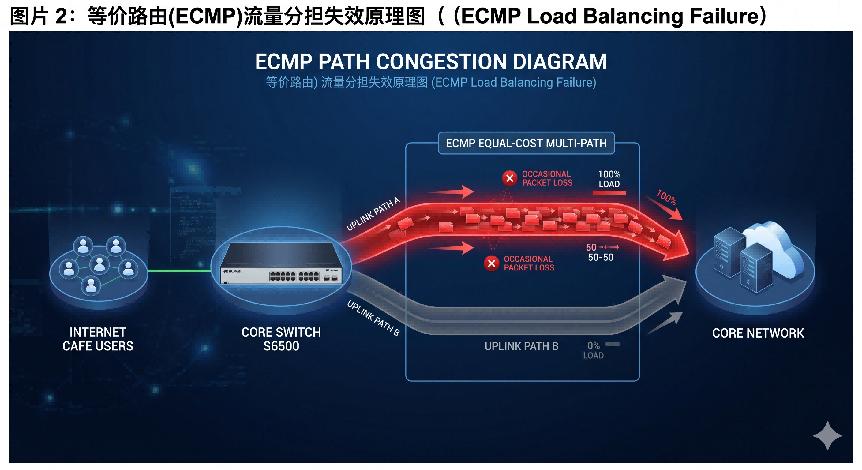
The engineers returned to the S6500 node and checked the operation mode, status, and traffic statistics of the two uplink ports. They found that traffic statistics on one uplink port were extremely low, confirming that this uplink was not participating in ECMP load balancing.
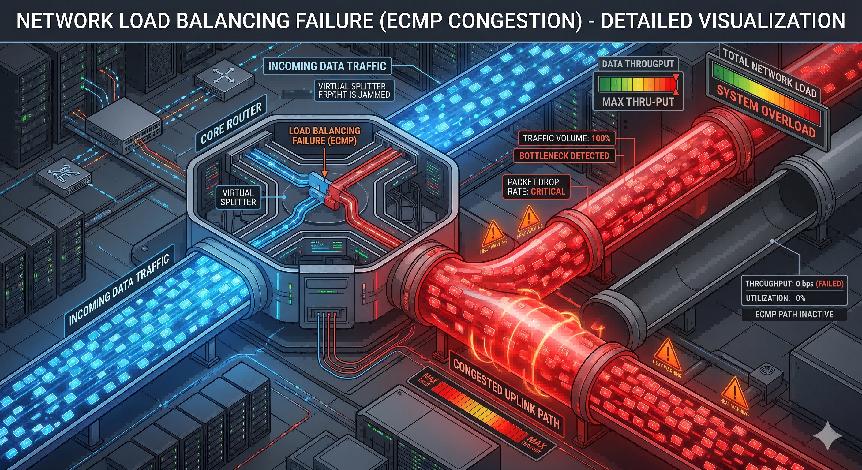
Further troubleshooting of VLAN configuration, Interface VLAN configuration, and routing protocol configuration on this port showed no errors. ARP information of the port was normal, and the peer port was reachable via ping. However, when checking the routing table, no corresponding uplink route for this port was found! It was strange that ARP was normal and the peer was pingable, but no corresponding route existed in the routing table. Engineers suspected that ping packets were traveling through the other uplink port, which was later verified by tracerouting the peer IP address.
With normal configuration and normal ARP information, why was the corresponding uplink route missing from the routing table? The engineers could not identify the cause, so they collected fault information and debug logs from the S6500. After completing data collection, the engineers shut down and re-enabled the port. Post-operation, ARP information remained normal, and the corresponding uplink route reappeared in the routing table. Verification confirmed that ECMP dual-uplink load balancing was restored.
After analyzing fault information and debug data from multiple nodes, the S6500 R&D team finally concluded that the failure was caused by abnormal routing table entry installation. The root cause of the routing table installation abnormality was likely high CPU utilization during bulk route insertion. The causes of high CPU utilization were various and required further in-depth analysis.
By Lanbras
Lanbras specializes in translating cutting-edge optical and Ethernet transmission technologies into clear, valuable insights that help our customers stay ahead in a fast-evolving digital world.
By turning complex technical concepts into practical, business-driven content, we aim to empower decision-makers with the knowledge they need to make confident, future-ready choices.
 EN
EN
 fr
fr  es
es  ru
ru  pt
pt  ar
ar  de
de 
 Internet Data Center
 FAQs
FAQs Industry News
 About Us
 Data Center Switch
  Enterprise Switch
  Industrial Switch
  Access Switch
  Integrated Network
  Optical Module & Cable

 Call us on:
  Email Us:
  2106B, #3D, Cloud Park Phase 1, Bantian, Longgang, Shenzhen, 518129, P.R.C.