1. Inter-VLAN Routing in 2026: Why Your L3 Switch Is the Engine of Modern Enterprise Networks
In 2026, enterprise network design has converged on a simple truth: segmentation and performance are not opposites. Intentional VLANs keep your manufacturing floor controllers, VoIP phones, security cameras, guest Wi-Fi, and enterprise servers from fighting over the same broadcast domain. But that segmentation creates a hard engineering boundary — VLANs do not natively communicate at Layer 2. When a PLC on VLAN 10 needs to talk to a historian server on VLAN 20, something at Layer 3 has to route that traffic.
That something is increasingly the L3 switch in your wiring closet — not a router-on-a-stick, not a firewall, not a controller. The L3 switch has become the first-hop router for everything from SMB cores to campus distribution layers, because it offers hardware-based forwarding at wire speed across dozens of VLAN subnets simultaneously.
Why 2026 Is the Year to Re-examine Your Inter-VLAN Design
Three forces are converging that make Inter-VLAN routing architecture a live question for every network engineer in 2026:
Multi-gigabit Wi-Fi 7 APs are generating east-west traffic volumes that make software-defined routing a bottleneck at the distribution layer.
OT/IT convergence is pushing more supervisory traffic across VLAN boundaries — historian servers, SCADA interfaces, and MES systems all sit in different subnets and require reliable, low-latency Inter-VLAN paths.
Security frameworks (IEC 62443, NIST CSF) now explicitly require network segmentation with documented, enforceable access policies between zones — meaning Inter-VLAN ACLs are no longer optional.
If your L3 switch is doing Inter-VLAN routing today, or if you are planning a network refresh, the decisions you make about VLAN architecture, SVI design, and policy enforcement will affect network performance and security for the next five to seven years.
2. Engineering Fundamentals: How Inter-VLAN Routing Actually Works
2.1 The SVI Is Your Default Gateway — Make It Reliable
When a host in VLAN 10 (subnet 10.10.10.0/24) needs to reach a host in VLAN 20 (subnet 10.10.20.0/24), it sends the packet to its default gateway — the SVI (Switch Virtual Interface) IP address configured on the L3 switch for VLAN 10. The L3 switch receives the frame on a trunk port, strips the VLAN tag, looks up the destination subnet in its routing table, and forwards the packet out the SVI for VLAN 20.
The critical operational requirement: the SVI must be UP and its corresponding VLAN must be allowed on every trunk that carries that subnet. If a switch port is configured as an access port in VLAN 10, hosts on that port can reach the VLAN 10 SVI — but only if the SVI is not administratively shut and IP routing is enabled globally.
2.2 RoAS vs L3 Switching: An Engineering Decision
The Router-on-a-Stick (RoAS) model remains valid for small sites with minimal traffic. However, L3 switching distributes the routing function across the switch's switching fabric using ASIC-based forwarding.
| Design Factor | RoAS | L3 Switch with SVIs |
|---|
| Scale | 3-5 VLANs, low east-west BW | Any scale, hardware forwarding |
| Forwarding performance | Router CPU/software | ASIC, wire-speed |
| Complexity | Subinterfaces + trunk + router | SVIs + routing table + ACLs |
| Redundancy | HSRP/VRRP on router | Dual-core L3 with RSTP/ERPS |
| 2026 fit: Industrial/OT | Small utility cabinets | Factory core/distribution |
| CAM/TCAM usage | Minimal | SVI count + ACL entries |
3. Engineering-Grade VLAN and SVI Design for Industrial Networks
3.1 Plan Before You Configure — The Inventory
Every Inter-VLAN routing failure usually stems from overlapping subnets, missing VLAN transport, or missing return routes.
Sample VLAN Inventory:
| VLAN ID | Purpose / Name | Subnet | Default Gateway (SVI) |
|---|
| VLAN 10 | Automation/OT | 10.10.10.0/24 | 10.10.10.1 |
| VLAN 20 | Standard IT/Workstations | 10.10.20.0/24 | 10.10.20.1 |
| VLAN 30 | VoIP | 10.10.30.0/24 | 10.10.30.1 |
| VLAN 40 | Security Cameras (NVR) | 10.10.40.0/24 | 10.10.40.1 |
| VLAN 50 | Guest Wi-Fi | 10.10.50.0/24 | 10.10.50.1 |
| VLAN 99 | Management/Console | 10.10.99.0/24 | 10.10.99.1 |
3.2 SVI Operational Contract
Before an SVI can route traffic, five conditions must be true:
The corresponding VLAN exists and is active.
The VLAN is allowed on every trunk port carrying that subnet.
The SVI is not administratively shut.
IP routing is enabled globally on the switch.
A route exists for non-local destinations (default route).
4. Configuration: Lanaotek L3 Switch Inter-VLAN Routing Step by Step
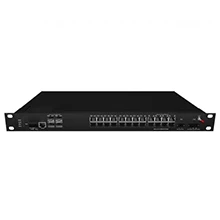
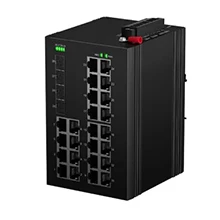
The following example uses the Lanaotek IRSL3LM-04X24GP-2D-Z8 industrial L3 managed switch.
4.1 Build the VLAN Structure
Step 1: Create VLANs and assign names
IRSL3LM04X24GP(config)# vlan database
IRSL3LM04X24GP(config-vlan)# vlan 10 name Automation_OT
IRSL3LM04X24GP(config-vlan)# vlan 20 name IT_Workstations
IRSL3LM04X24GP(config-vlan)# vlan 30 name VoIP
IRSL3LM04X24GP(config-vlan)# vlan 40 name Security_Cameras
IRSL3LM04X24GP(config-vlan)# vlan 99 name Management
IRSL3LM04X24GP(config-vlan)# exit
Step 2: Verify VLAN transport on trunk ports
IRSL3LM04X24GP# show interfaces trunk
Step 3: Configure access ports
IRSL3LM04X24GP(config)# interface gigabitEthernet 1/0/1
IRSL3LM04X24GP(config-if)# switchport mode access
IRSL3LM04X24GP(config-if)# switchport access vlan 10
IRSL3LM04X24GP(config-if)# switchport poe
IRSL3LM04X24GP(config-if)# exit
4.2 Configure SVIs and Enable IP Routing
Step 4: Create SVIs and assign IPs
IRSL3LM04X24GP(config)# interface vlan 10
IRSL3LM04X24GP(config-if)# ip address 10.10.10.1 255.255.255.0
IRSL3LM04X24GP(config-if)# no shutdown
IRSL3LM04X24GP(config-if)# exit

IRSL3LM04X24GP(config)# interface vlan 20
IRSL3LM04X24GP(config-if)# ip address 10.10.20.1 255.255.255.0
IRSL3LM04X24GP(config-if)# no shutdown
IRSL3LM04X24GP(config-if)# exit
Step 5: Enable IP routing globally
IRSL3LM04X24GP(config)# ip routing
Step 6: Define the upstream default route
IRSL3LM04X24GP(config)# ip route 0.0.0.0 0.0.0.0 <upstream-router-IP>
4.3 Configure Inter-VLAN ACLs for Zone Security
IRSL3LM04X24GP(config)# ip access-list extended INTER-VLAN-POLICY
IRSL3LM04X24GP(config-acl)# remark === DENY GUEST TO INTERNAL NETWORKS ===
IRSL3LM04X24GP(config-acl)# deny ip 10.10.50.0 0.0.0.255 10.10.0.0 0.0.255.255
IRSL3LM04X24GP(config-acl)# remark === DENY IoT/OT TO IT/Management ===
IRSL3LM04X24GP(config-acl)# deny ip 10.10.10.0 0.0.0.255 10.10.20.0 0.0.0.255
IRSL3LM04X24GP(config-acl)# deny ip 10.10.10.0 0.0.0.255 10.10.99.0 0.0.0.255
IRSL3LM04X24GP(config-acl)# remark === ALLOW SPECIFIC HOST-TO-SERVER FLOWS ===
IRSL3LM04X24GP(config-acl)# permit tcp 10.10.10.0 0.0.0.255 host 10.10.20.100 eq 502
IRSL3LM04X24GP(config-acl)# permit icmp any any
IRSL3LM04X24GP(config-acl)# deny ip any any
IRSL3LM04X24GP(config-acl)# exit

IRSL3LM04X24GP(config)# interface vlan 10
IRSL3LM04X24GP(config-if)# ip access-group INTER-VLAN-POLICY in
5. Validation and Troubleshooting
5.1 Three-Step Acceptance Test
Step A — Local gateway reachability: Ping the SVI IP (e.g., 10.10.10.1) from a host in that VLAN.
Step B — Cross-VLAN forwarding: Ping a host in a different VLAN (e.g., 10.10.20.50).
Step C — Upstream reachability: Ping an external IP (e.g., 8.8.8.8).
5.2 Layered Troubleshooting Order
Layer 1 (Physical/Trunk): show interfaces trunk
Layer 2 (Switching): show mac address-table vlan 10
Layer 3 (Routing): show ip interface brief and show ip route
Layer 4 (Policy): show access-lists INTER-VLAN-POLICY
6. Long-Term Operations: Stability
Change Management: Always update the VLAN inventory before making edits.
Monitoring: Track CPU utilization (ASIC vs Software forwarding) and SVI errors.
Documentation: Maintain a handoff document with the SVI contract table and ACL policy matrix.
Ready to Upgrade Your Inter-VLAN Architecture?
The Lanaotek IRSL3LM-04X24GP-2D-Z8 industrial
delivers hardware-based Inter-VLAN routing across 24 Gigabit PoE+ ports and 4 10G SFP+ uplinks.
Keywords: Inter-VLAN routing, L3 switch, SVI configuration, VLAN routing, industrial Ethernet switch, network segmentation, ACL inter-VLAN, Lanaotek switch.
By Lanaotek
Lanaotek specializes in translating cutting-edge optical and Ethernet transmission technologies into clear, valuable insights that help our customers stay ahead in a fast-evolving digital world.
By turning complex technical concepts into practical, business-driven content, we aim to empower decision-makers with the knowledge they need to make confident, future-ready choices.
 EN
EN
 fr
fr  es
es  ru
ru  pt
pt  ar
ar  de
de 
 Internet Data Center
 FAQs
FAQs Industry News
 About Us
 Data Center Switch
  Enterprise Switch
  Industrial Switch
  Access Switch
  Integrated Network
  Optical Module & Cable




 Call us on:
  Email Us:
  2106B, #3D, Cloud Park Phase 1, Bantian, Longgang, Shenzhen, 518129, P.R.C.