In 2026, home networking is undergoing a revolution driven by ever-increasing fiber broadband speeds of 2.5G, 5G, and even 10G. With these advancements comes a significant pain point for network engineers, homelab enthusiasts, and IT professionals: outdated, power-hungry ISP-provided hardware that throttles performance and complicates network configurations. If you’re frustrated with the clutter of ISP ONTs, power bricks, and double-NAT setups, it’s time to streamline your network with a GPON ONU SFP stick.
This guide will help you understand what a GPON ONU SFP stick is, why it’s the ultimate solution for modern fiber networks, and how you can replace your ISP’s hardware for a clean, high-performance setup.
What is a GPON ONU SFP Stick and How Does it Work?
Simplifying Fiber with an SFP ONU Adapter
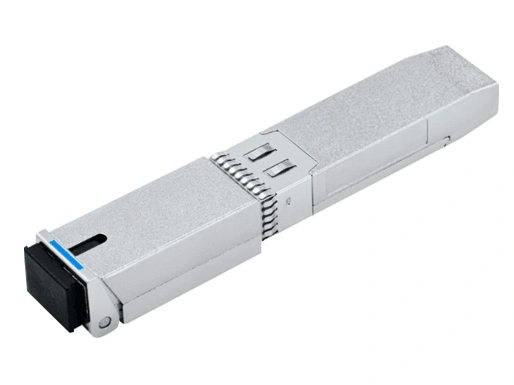
A GPON ONU SFP stick is a small, powerful piece of hardware engineered to take the place of your ISP-provided Optical Network Terminal (ONT). It’s essentially a pluggable transceiver in a Small Form-factor Pluggable (SFP) form factor that acts as a fully functional Optical Network Unit (ONU).
Here’s how it works:
A GPON ONU SFP device enables your fiber optic internet connection to terminate directly in SFP-capable equipment, such as a high-performance router or switch.
It utilizes 1310nm TX / 1490nm RX wavelengths to communicate with your Internet Service Provider's Optical Line Terminal (OLT).
Thanks to its MAC address cloning capability, the SFP stick can authenticate your device to the OLT, effectively bypassing your ISP’s ONT device.
Why 2026 Marks a Turning Point for GPON ONU Sticks
With an increasing number of ISPs rolling out 2.5G and 10G FTTH solutions, legacy 1G ONTs have become a bottleneck for modern home networking. Moreover, power consumption concerns are pushing tech-savvy users toward lighter, energy-efficient solutions like the GPON ONU SFP stick.
Top 3 Reasons to Switch to a GPON ONU SFP Stick
If you’re still hesitant about swapping out your ISP-provided ONT, here are the top reasons why upgrading to an SFP ONU stick is a no-brainer:
1. Hardware Consolidation
Eliminate unnecessary hardware from your network rack or wall unit by removing the bulk of a dedicated ONT. An SFP ONU stick plugs directly into the SFP port of your premium router or switch, meaning no extra hardware is needed. Say goodbye to having multiple devices cluttering up your setup.
2. Reduced Latency
External ONTs introduce additional “hops” in your fiber network, increasing latency. These devices also dedicate less processing power to efficiently passing traffic, further degrading performance. An SFP stick, on the other hand, ensures that your data travels straight to your high-end router with minimal delay.
3. Full Control Over Your Network
Using a GPON ONU stick gives you total control over your fiber connection. Features like VLAN tagging, MAC address management, and detailed performance monitoring—typically locked away by ISPs using their own ONTs—become accessible. Enthusiasts running Ubiquiti, MikroTik, or pfSense setups will immediately recognize the advantages of such granular control.
Step-by-Step Guide: Replacing Your ONT with an SFP Stick
Disclaimer
Before proceeding, always ensure you’re complying with your ISP’s terms of service. Some providers may not support third-party hardware or might restrict OLT authentication.
Phase 1: Identify Your GPON Details
To authenticate with your ISP’s OLT, you’ll need two critical pieces of information from your existing ONT or ISP router:
Tip: Log in to your ISP router’s web interface or contact your provider to retrieve these details.
Phase 2: Choosing the Right Hardware
Not all GPON ONU sticks are created equal. A reliable option like the Lanaotek GPON ONU Stick offers:
Phase 3: Configuring the SFP ONU Stick
Insert the SFP Stick: Plug the device into the SFP port of your router or switch.
Login to the Stick’s Web Management Interface: Typically accessible via 192.168.1.1.
Input Authentication Data: Enter the GPON Serial Number and PLOAM password provided by your ISP.
Phase 4: Testing Connectivity
Verify your router establishes a secure GPON link with the ISP’s OLT.
Check the negotiated handshake speeds (e.g., 1.244Gbps upstream, 2.488Gbps downstream) to ensure correct operation.
Use Digital Optical Monitoring (DOM) to monitor light levels and connection stability.
Compatibility Watch: Ubiquiti, MikroTik, and pfSense
Not all SFP ports are created equal, and compatibility depends on the make and model of your primary router or switch. Here’s a guide to popular hardware:
| Brand | Supported Models | Notes |
| Ubiquiti | UniFi Dream Machine Pro, EdgeRouter 4 | Ensure DOM support and 2.5G/10G SFP port compatibility for future-proofing. |
| MikroTik | CCR2004, RB4011, CRS317 | Easy VLAN configuration and native compatibility with GPON SFP sticks. |
| pfSense | Netgate 6100, 4100 Works seamlessly; | ensure correct configuration of VLAN and WAN port assignments. |
Why Quality Matters: Avoiding the "Cheap Stick" Trap
As tempting as it may be to opt for a low-cost SFP ONU stick, there are key reasons to avoid these counterfeit or budget models. Common issues include:
Overheating: Cheaper models lack proper heat dissipation, leading to instability and premature failure.
Signal Loss Under Load: Inferior optical components may fail to maintain a strong connection during extended high traffic.
Choose a trusted product like the Lanaotek GPON ONU Stick, which is designed for 24/7 stable operation with effective thermal management and optimized performance even for demanding use cases.
Conclusion: Reclaim Your Network
The movement toward "SFP-only" home networking represents a significant step forward for modern IT enthusiasts and professionals. By replacing your bulky, ISP-controlled ONT with a streamlined GPON ONU SFP Stick, you gain unparalleled control, performance, and simplicity in your fiber network.
FAQ (Schema Markup)
Can I use this with any ISP?
Most fiber ISPs support GPON ONU sticks, but proprietary locks on OLTs may require additional steps.
What connector does it use?
The stick uses a Simplex SC/APC connector, which matches standard residential fiber drops.
Do I need a separate ONT?
No, the GPON ONU stick acts as a direct replacement, eliminating the need for a standalone ONT.
Source: Lanaotek, internationally renowned manufacturer of Ethernet switch brands .
Recommend: industrial ethernet switch , PoE Industrial Ethernet Switch , PoE switch manufacturer , ethernet switch manufacturer , network switch manufacturer , industrial Ethernet switch manufacturer , industrial Ethernet switch suppliers , enterprise network switch brands , Industrial PoE switch manufacturer ,
By Lanaotek
Lanaotek specializes in translating cutting-edge optical and Ethernet transmission technologies into clear, valuable insights that help our customers stay ahead in a fast-evolving digital world.
By turning complex technical concepts into practical, business-driven content, we aim to empower decision-makers with the knowledge they need to make confident, future-ready choices.
 EN
EN
 fr
fr  es
es  ru
ru  pt
pt  ar
ar  de
de 
 Internet Data Center
 FAQs
FAQs Industry News
 About Us
 Data Center Switch
  Enterprise Switch
  Industrial Switch
  Access Switch
  Integrated Network
  Optical Module & Cable



 Call us on:
  Email Us:
  2106B, #3D, Cloud Park Phase 1, Bantian, Longgang, Shenzhen, 518129, P.R.C.